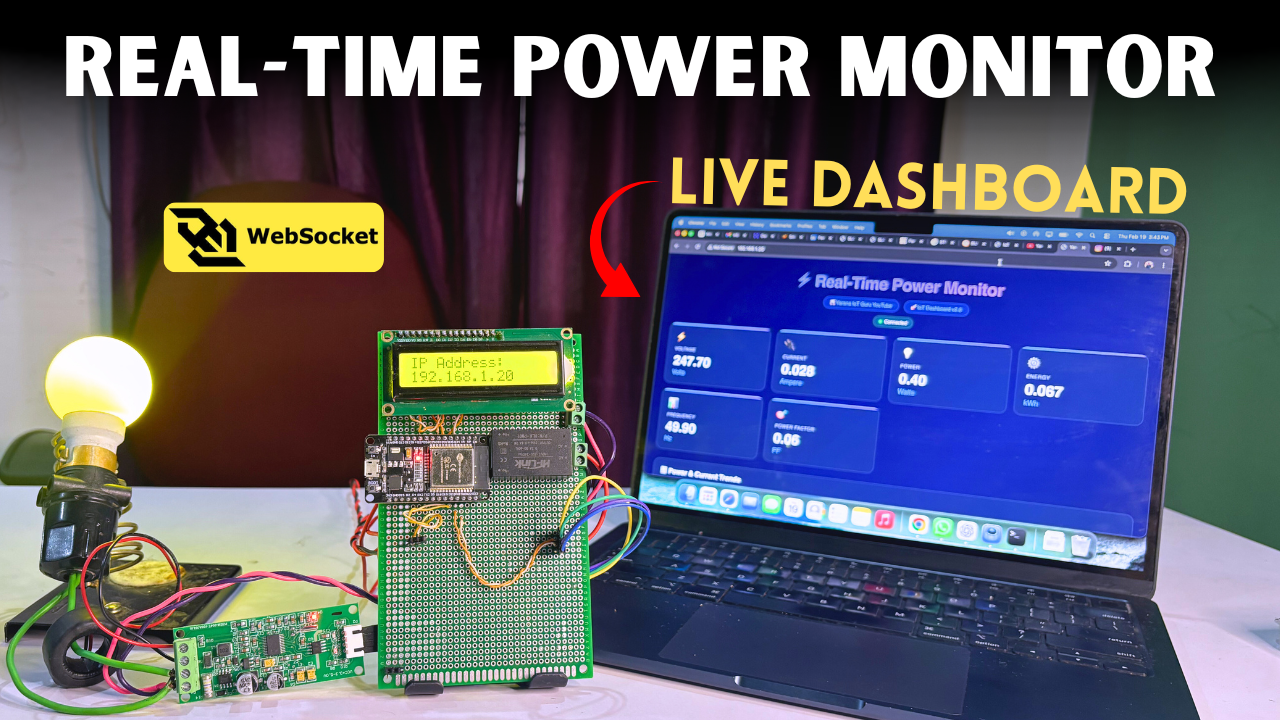
Smart Electricity Bill Saver & Real-Time Power Monitor | ESP32 IoT Energy System

Smart Electricity Bill Saver & Real-Time Power Monitor | ESP32 IoT Energy System

1️⃣ Internet of Things (IoT) 2️⃣ Energy Monitoring Systems 3️⃣ Smart Home Automation 4️⃣ Embedded Systems 5️⃣ Industrial IoT Solutions

⚡ Introduction

Electricity bills are increasing rapidly. Most users do not know:

  • Real-time power consumption
  • Appliance load impact
  • Estimated bill before month-end
  • Overload risk

Traditional meters only show total units consumed.

To solve this, we developed:

🔥 Smart Electricity Bill Saver & Real-Time Power Monitor

An IoT-based energy monitoring system that tracks real-time voltage, current, power, energy (kWh), and calculates estimated electricity bill instantly.


🔥 Problem Statement

❌ No real-time monitoring
❌ Unexpected high bills
❌ No overload alert
❌ No energy analytics

Energy waste continues silently.


💡 Solution Overview

✔ Real-time Voltage Monitoring
✔ Real-time Current Monitoring
✔ Power (Watt) Calculation
✔ Energy (kWh) Tracking
✔ Live Bill Estimation
✔ Overload Protection
✔ MQTT Cloud Monitoring
✔ Optional Relay Load Cut


🧰 Required Hardware


1️⃣ ESP32 Development Board

https://m.media-amazon.com/images/I/61MDW%2BU%2BrvL._AC_UF894%2C1000_QL80_.jpg
https://www.voltaat.com/cdn/shop/products/voltaat-deveb-esp-doit-esp32-devkit-v1-development-board-40601070862653_480x480.jpg?v=1767258647
https://www.az-delivery.de/cdn/shop/products/esp32-nodemcu-module-wlan-wifi-development-board-mit-cp2102-nachfolgermodell-zum-esp8266-kompatibel-mit-arduino-872375.jpg?v=1679400491
https://www.xecor.com/files/uploads/editor/b/9aab90c4588d42c7a90c20f9d8f4a91b.webp

Role:

  • WiFi communication
  • Data processing
  • IoT connectivity

2️⃣ PZEM-004T v3.0 Energy Monitor

https://inwfile.com/s-j/u77r0o.jpg
https://robodo.in/cdn/shop/products/51PHCWF3ieL.jpg?v=1672847411&width=720
https://robodo.in/cdn/shop/products/61aAfOyz1_L.jpg?v=1739439847
https://m.media-amazon.com/images/I/61OIU3asXuL._AC_UF1000%2C1000_QL80_.jpg

Role:

  • Voltage measurement
  • Current measurement
  • Power calculation
  • Energy tracking

3️⃣ 5V SMPS Power Supply

https://quartzcomponents.com/cdn/shop/files/Switch-Power-Supply-Module-PCB.jpg?v=1691565605
https://m.media-amazon.com/images/I/61Ri0o8WwML._AC_UF1000%2C1000_QL80_.jpg
https://m.media-amazon.com/images/I/61avIRudIYL._AC_UF1000%2C1000_QL80_.jpg
https://electronicspices.com/uploads/products/3158/large5V-2A-DC-output-power-supply-circuit-board-37mm-x-37mm-x-20mm-AC-to-DC.jpg

Provides stable power to ESP32.


4️⃣ Optional Relay Module

https://images.openai.com/static-rsc-3/ylO0v5KRES_WAbZ2l8EctWsUrYuuwLTqzmEX2fNf9DmrHqBDtDOyjOTXiw7EGibeQtgkzAISaaq0MV6Eo3Kgqcr-gNqE_oCFzy1Lbx4V7qE?purpose=fullsize&v=1
https://images.openai.com/static-rsc-3/HFoNVWbXAZjoOD5lAvx24EXwuItqKfl1b24htuSSxTn9r3xULrbj9t7ST3jKbMVln0qVuTJ_OgtMWAcllJcrnCuRS_ZC_p7EJrWdHzRaKA0?purpose=fullsize&v=1
https://store-usa.arduino.cc/cdn/shop/files/TPX00170_02.extra_4204173e-acd5-4680-ba7f-626a65e38656_600x600.jpg?v=1758533371
https://www.tigoe.com/pcomp/img/relay-schematic.jpg

Used for overload-based automatic power cut.


🔌 Circuit Diagram

https://www.researchgate.net/publication/370965608/figure/fig2/AS%3A11431281160746487%401684859471087/Schematic-of-Pre-SEMMS-with-PZEM-004T-and-ESP32.png
https://www.researchgate.net/publication/362733776/figure/fig3/AS%3A11431281080522131%401661321745439/Circuit-Schematic-Diagram-of-Electric-Energy-Meter-18.jpg
https://www.researchgate.net/publication/370965608/figure/fig2/AS%3A11431281160746487%401684859471087/Schematic-of-Pre-SEMMS-with-PZEM-004T-and-ESP32.png
https://raw.githubusercontent.com/CircuitSetup/Expandable-6-Channel-ESP32-Energy-Meter/master/Images/6-channel_v1.3.jpg

🔗 Complete Wiring Details

ESP32 ↔ PZEM

ESP32 PinPZEM Pin
GPIO17RX
GPIO16TX
5VVCC
GNDGND

CT Coil

Install on AC phase wire only.

Optional Relay

GPIO4 → IN
5V → VCC
GND → GND

⚠ Follow proper AC safety precautions.


🧠 Software Used

  • Arduino IDE
  • MQTT Broker (HiveMQ / Mosquitto)
  • ESP32 Core
  • PZEM004Tv30 Library
  • PubSubClient Library

💻 Complete ESP32 Code

#include <WiFi.h>
#include <PubSubClient.h>
#include <PZEM004Tv30.h>

const char* ssid = "YOUR_WIFI_NAME";
const char* password = "YOUR_WIFI_PASSWORD";

const char* mqtt_server = "broker.hivemq.com";

#define RELAY_PIN 4
#define PZEM_RX 16
#define PZEM_TX 17

float overloadCurrent = 10.0;
float electricityRate = 6.0;

WiFiClient espClient;
PubSubClient client(espClient);
HardwareSerial pzemSerial(2);
PZEM004Tv30 pzem(pzemSerial, PZEM_RX, PZEM_TX);

void setup_wifi() {
  WiFi.begin(ssid, password);
  while (WiFi.status() != WL_CONNECTED) {
    delay(500);
  }
}

void reconnect() {
  while (!client.connected()) {
    client.connect("PowerMonitorClient");
  }
}

void setup() {
  Serial.begin(115200);
  pinMode(RELAY_PIN, OUTPUT);
  digitalWrite(RELAY_PIN, LOW);
  setup_wifi();
  client.setServer(mqtt_server, 1883);
}

void loop() {
  if (!client.connected()) reconnect();
  client.loop();

  float voltage = pzem.voltage();
  float current = pzem.current();
  float power = pzem.power();
  float energy = pzem.energy();

  float bill = energy * electricityRate;

  Serial.print("Voltage: "); Serial.println(voltage);
  Serial.print("Current: "); Serial.println(current);
  Serial.print("Power: "); Serial.println(power);
  Serial.print("Energy: "); Serial.println(energy);
  Serial.print("Estimated Bill: "); Serial.println(bill);

  if(current > overloadCurrent){
    digitalWrite(RELAY_PIN, HIGH);
    Serial.println("Overload Detected - Power Cut");
  }

  delay(3000);
}

⚙️ Working Logic

  1. Read Voltage
  2. Read Current
  3. Calculate Power
  4. Read Energy (kWh)
  5. Calculate Estimated Bill
  6. Detect Overload
  7. Publish to MQTT

🏠 Applications

  • Homes
  • Shops
  • Offices
  • Solar systems
  • Energy audit projects

💼 Business Opportunity

✔ Smart home product
✔ IoT commercial device
✔ Energy audit service
✔ Rental property monitoring


📞 Project Support

For complete source code, dashboard, PCB, ready device:

📲 WhatsApp: +91 7052722734


🏁 Conclusion

This system helps:

✔ Reduce electricity bills
✔ Monitor real-time usage
✔ Prevent overload
✔ Improve energy efficiency

A scalable IoT-based energy management solution by Yarana IoT Guru.

📞 Contact YaranaIoT Guru Empowering IoT Innovation | ESP32 | Home Automation | Smart Solutions | 50K+ Community

We’d love to hear from you! Whether it’s IoT project queries, collaborations, tech support, custom PCB design, bulk orders, corporate training, college workshops, or freelance development — we’re just one message away.


✉️ Email (Official)

For detailed inquiries, project support, business collaboration, sponsorships, or documentation: 📩 contact@yaranaiotguru.in 📧 Alternate: support@yaranaiotguru.inResponse: Within 24 hours (Mon–Sat) 💡 Best for attachments (code, schematics, logs, etc.)


📱 Phone / WhatsApp (24×7 Support)

Instant live help, troubleshooting, project consultation, or order updates: 📞 +91 70527 22734 💬 WhatsApp: Chat NowCall Hours: Mon–Sat, 10 AM – 7 PM IST 🚀 Emergency? WhatsApp anytime — reply within 1 hour


▶️ YouTube Channel

Step-by-step IoT builds, live coding, ESP32, Blynk, Node-RED, MQTT, Home Assistant & more: 🔗 Yarana IoT Guru 📺 1,200+ Videos | 52K+ Subs | 5.5M+ Views | 4.8★ Rating 🎥 New Video Every Week — 🔔 Subscribe & Turn On Notifications


🛠 GitHub (100% Open Source)

All codes, Arduino sketches, PlatformIO projects, Node-RED flows, MQTT configs & docs: 🔗 github.com/YaranaIotGuru50+ Repos | 10K+ Stars & Forks

🔥 Top Projects:

  • ESP32 WebSocket Real-Time Dashboard
  • Smart Home with Blynk & Alexa
  • IoT Irrigation System with Soil Moisture
  • MQTT + Node-RED + MySQL Logging
  • OLED Weather Station with API

📸 Instagram

Daily reels, quick tips, live builds, student showcases & giveaways: 🔗 @YaranaIoTGuru 📱 10K+ Followers | Reels | Stories | Live Sessions


💼 LinkedIn (Professional Network)

B2B, IoT consulting, training, hiring & partnerships: 🔗 Yarana IoT Guru

🤝 Services Offered:

  • Custom IoT Product Development
  • Embedded Systems Training
  • College Workshops & FDPs
  • PCB Design & Prototyping

🐦 Twitter / X

Real-time updates, polls, project launches & community Q&A: 🔗 @YaranaIoTGuru 📢 Follow for instant alerts


🛠 Hackster.io (Project Showcases)

In-depth write-ups, circuits, BOM, code & ratings: 🔗 hackster.io/yaranaiotguru 🏆 50+ Projects | 100K+ Views | Top 5% Creator


🌟 Community Platforms

PlatformLinkPurpose
Telegram Channelt.me/YaranaIoTGuruProject files, PDFs, updates
Telegram Groupt.me/YaranaIoTCommunityPeer support, doubts
Discord Serverdiscord.gg/yarana-iotLive voice help, coding rooms
WhatsApp CommunityJoin HereAnnouncements & polls

🏢 Office & Studio Address

Yarana Studio & Software (Yarana IoT Guru HQ) 📍 Near Rookh Baba Mandir, Umariya Badal Urf Gainda, Allahabad (Prayagraj), Uttar Pradesh – 212507, India ⭐ Google Rating: 5.0 ★ (100+ Reviews)

🕒 Opening Hours: Mon–Sat: 10:00 AM – 5:00 PM Sunday: Closed

🌐 Associated Website: yaranawebtech.i

Leave a Reply

Your email address will not be published. Required fields are marked *